 HOME
HOME 3D RENDERING
 3D SCANNING
 XR DEVELOPMENT
Build the Caravan Before the Journey Begins
Give buyers an interactive way to explore models, walk through layouts and select colours, features and upgrade packages before they contact a dealer or place an order.
WHY IT EXISTS
A Clearer Way to Sell a Product with Hundreds of Decisions
Choosing a caravan, camper or specialist trailer involves much more than selecting a model. Buyers need to compare floorplans, sleeping capacity, storage, finishes, off-grid equipment, towing requirements and optional upgrades. Much of that information is currently spread across brochures, specification tables, photographs and conversations with different dealers.
A purpose-built 3D configurator brings the range together. It lets customers move from broad model selection to a personalised specification while seeing how their choices affect the exterior, interior and overall package.
THE JOURNEY
The Buyer Journey

Compare Models
Filter or browse by size, berth, layout, intended use, vehicle type or price category. Buyers start with the range and narrow to the model that fits their needs.
Walk Through the Layout
Move around the interior, inspect key spaces and understand circulation more clearly than a floorplan alone allows. No guesswork about headroom, bed length or kitchen access.


Choose the Look
Change exterior colours, decals, cabinetry, upholstery, benchtops, flooring and other visible finishes. Every selection updates the model in real time.
Add Equipment
Select power, water, suspension, climate, connectivity, safety and touring packages within the rules of the chosen model. Running price or package indicators update alongside.


Send the Build to a Dealer
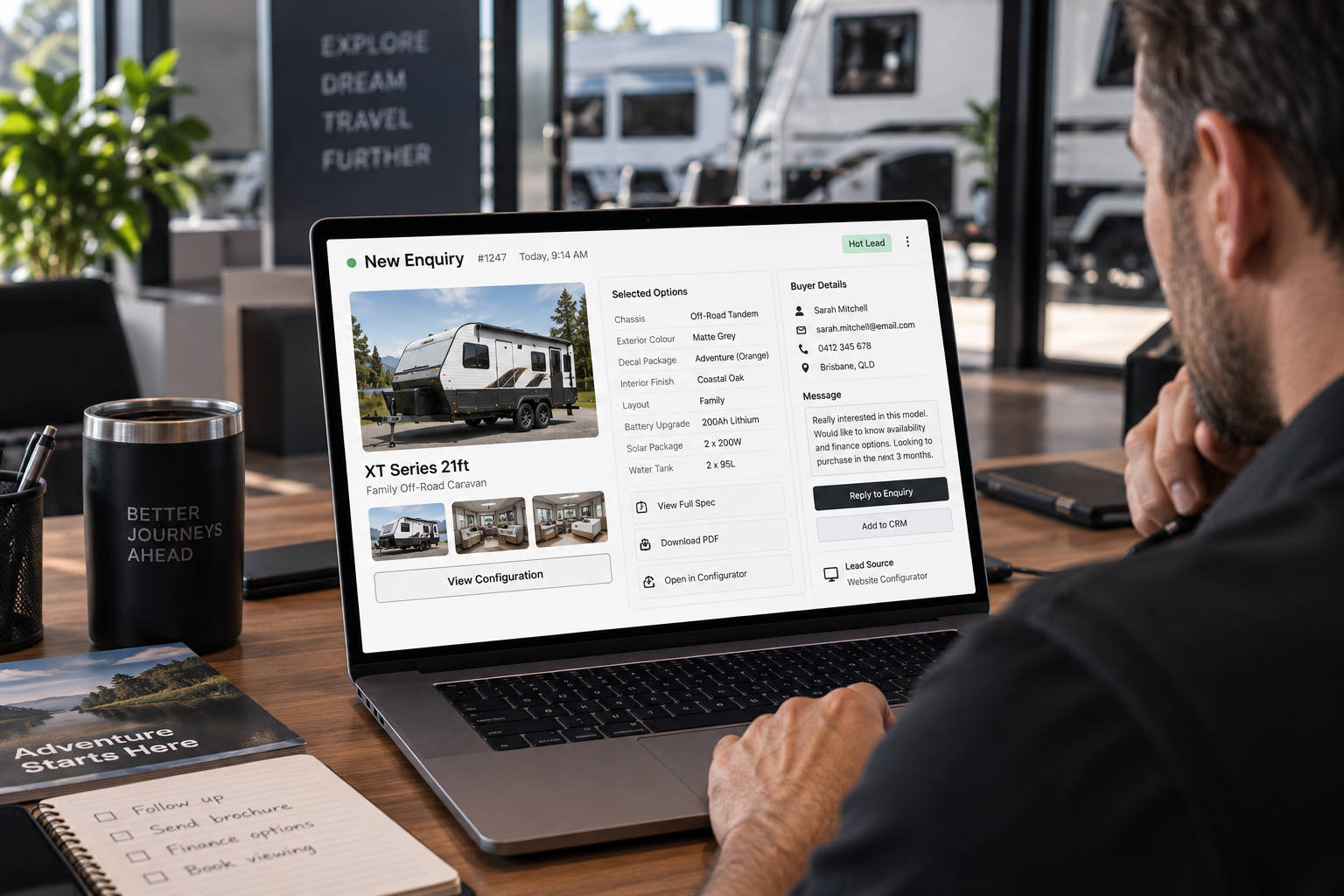
Submit a detailed enquiry with the model, selected options and preferred dealership already attached. The dealer receives a qualified lead, not a blank contact form.
FEATURES
Features That Matter in Caravan and Trailer Sales
Model & Layout
Selection

- Model range comparison
- Floorplan and berth selection
- Interior walkthrough or cutaway view
- Expandable sections, awnings or slide-outs
- Storage and equipment-location views
- Dimensions, weights and key specifications
Finish & Appearance
Options

- Exterior body colours, wraps and decals
- Wheel, trim and protection options
- Cabinetry and joinery finishes
- Upholstery, fabrics and soft furnishings
- Benchtops, splashbacks and flooring
- Lighting and interior styling packages
Touring & Technical
Packages

- Solar, battery and electrical upgrades
- Water storage and plumbing options
- Air conditioning and heating
- Suspension, tyres and off-road packages
- Connectivity, entertainment and security
- Kitchen, bathroom and appliance upgrades
Quote & Dealer
Handover

- Running price or package-level pricing
- Availability and lead-time messaging
- Finance or repayment prompts
- Configuration summary and product codes
- Dealer selection and lead routing
- CRM, quotation or order-system integration

BUILT-IN LOGIC
Prevent Impossible Builds
How we encode the rules
- Mandatory components added automatically when required
- Unavailable choices hidden or explained with context
- Package rules updated as the range evolves
WHO IT SERVES
Built for Buyers, Dealers and Manufacturers

For the Buyer
The configurator reduces uncertainty. It helps people understand the range, visualise the interior and build a shortlist before travelling to a dealership or attending a show.
For the Dealer
The incoming enquiry contains more useful information than a general contact form. Sales staff can see the customer's chosen model, options and priorities before making contact.

For the Manufacturer
The experience presents the range consistently, controls available combinations and produces data about which models, packages and upgrades customers are selecting.
DEPLOYMENT
Use It Across the Entire Sales Network
The same configurator can support the public website, dealer websites, showroom displays, exhibitions and remote sales calls. Access, pricing and calls to action can be adapted for different markets or dealer regions while the core product assets and rules remain centrally controlled.
Consumer-facing website experience
Dealer-assisted configuration sessions
Touchscreen display at dealerships or caravan shows
Links used in digital advertising campaigns
Remote screen-sharing with interstate buyers
Internal product and sales training
New-model launch before every physical display unit is available

OUR APPROACH
Development Roadmap
Range Discovery
Map current models, floorplans, option structure and sales process.
Asset Assessment
Review CAD, drawings, photography and existing 3D models for each priority product.
Pilot Model
Build one representative caravan or trailer with a focused set of high-value options.
Buyer Testing
Test navigation, layout understanding, option terminology and dealer handover with real users and sales staff.
Range Expansion
Add further models, packages, integrations and content using the proven framework.
Ongoing Updates
Maintain the configurator as model years, standard inclusions and option availability change.
COMMERCIAL BENEFITS
Commercial Benefits
Generate better-qualified enquiries for dealers
Help buyers compare models without relying on brochures alone
Increase visibility of profitable upgrade packages
Reduce confusion about standard and optional equipment
Improve consistency across the dealer network
Support interstate and remote buyers
Create a launch platform for new models
Collect demand signals before the customer submits an enquiry

Frequently Asked Questions
Can buyers walk through the inside of the caravan?
Yes. Depending on the chosen presentation, buyers can navigate an interactive interior, use fixed viewpoints or switch between a walkthrough and a cutaway view. The right approach depends on model size, performance requirements and device use.
Can the configurator manage different floorplans?
Yes. Each floorplan can be presented as a separate model or configuration path. Shared assets and option logic can be reused where appropriate, while model-specific restrictions remain controlled.
Can weight or compatibility rules be included?
Yes, provided the business supplies the authoritative rules and data. The configurator can restrict incompatible choices, add required components or display indicative weight impacts. Final compliance and towing suitability should still be confirmed through the manufacturer or dealer.
Can enquiries be sent to the nearest dealer?
Yes. Dealer selection can be based on postcode, customer choice, territory or another agreed rule. The selected configuration can be attached to the lead sent to the dealer or CRM.
Can pricing change between dealers or regions?
Potentially. Pricing can be centrally controlled, hidden, shown as indicative, or connected to region-specific data. The correct model depends on the manufacturer’s dealer agreements and system architecture.
Can it be used at caravan shows?
Yes. A browser-based experience can be used on large touchscreens, tablets and sales laptops. Event connectivity and offline requirements should be considered during scoping.
Should we build the full range at once?
Usually not. A pilot using one important or representative model allows the visual quality, option structure and commercial workflow to be tested before investing in the complete range.