 HOME
HOME 3D RENDERING
 3D SCANNING
 XR DEVELOPMENT
Bring Workplace Hazards into a Controlled Training Space
Combine a visible real environment with virtual hazards, equipment and consequences so workers can practise safety decisions without creating the real exposure.
Workers do not encounter hazards as isolated questions. They encounter them in a space containing equipment, people, noise, time pressure and competing tasks.
A mixed reality simulation can place those cues into a real training room and require the learner to inspect, decide and act.
Because the learner can still see the room, mixed reality can use physical routes, props and facilitator interaction. Virtual elements then introduce conditions that would be difficult or unsafe to stage, such as moving plant, an energy release, a suspended load or a developing emergency.
Safety Scenarios for Mixed Reality
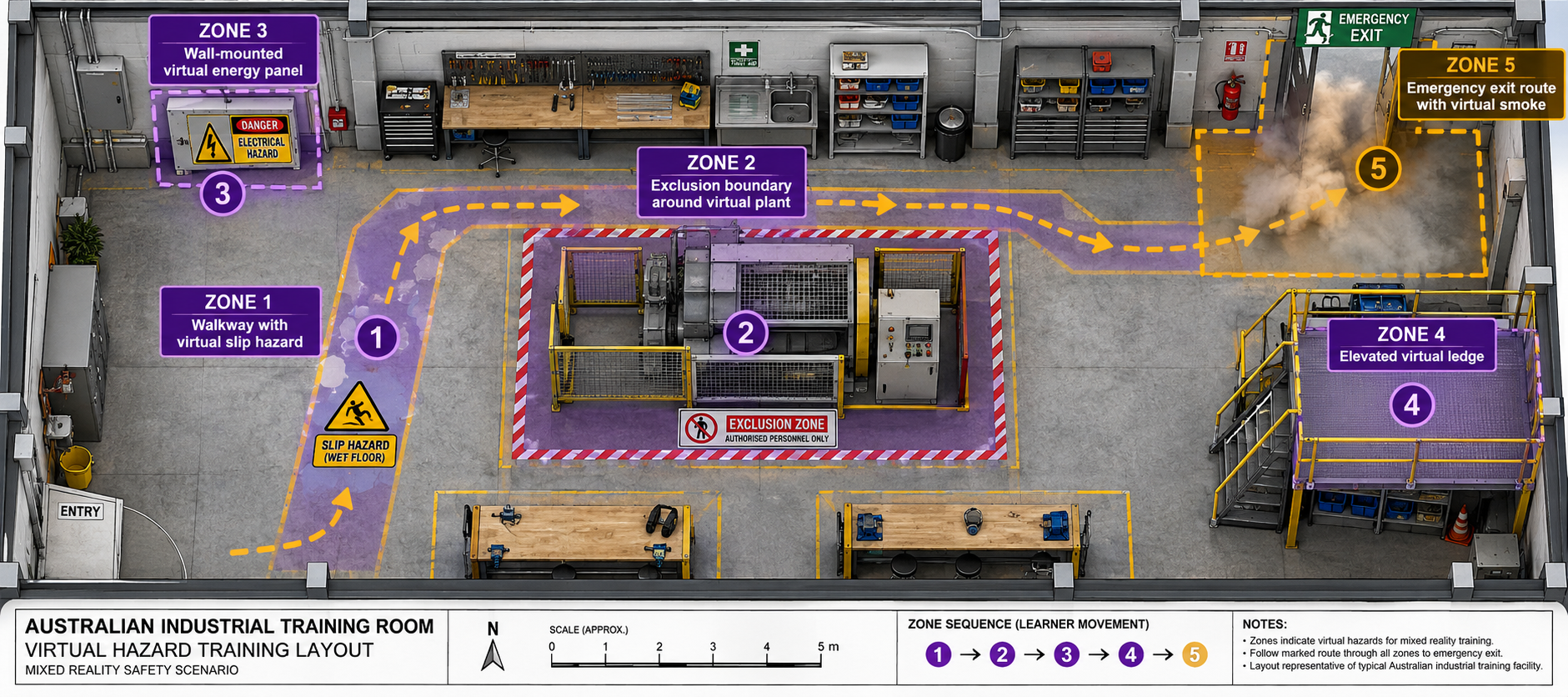

Hazard Recognition Walkthrough
Learners move through a controlled space, identify physical and virtual hazards and select the controls required before work starts.
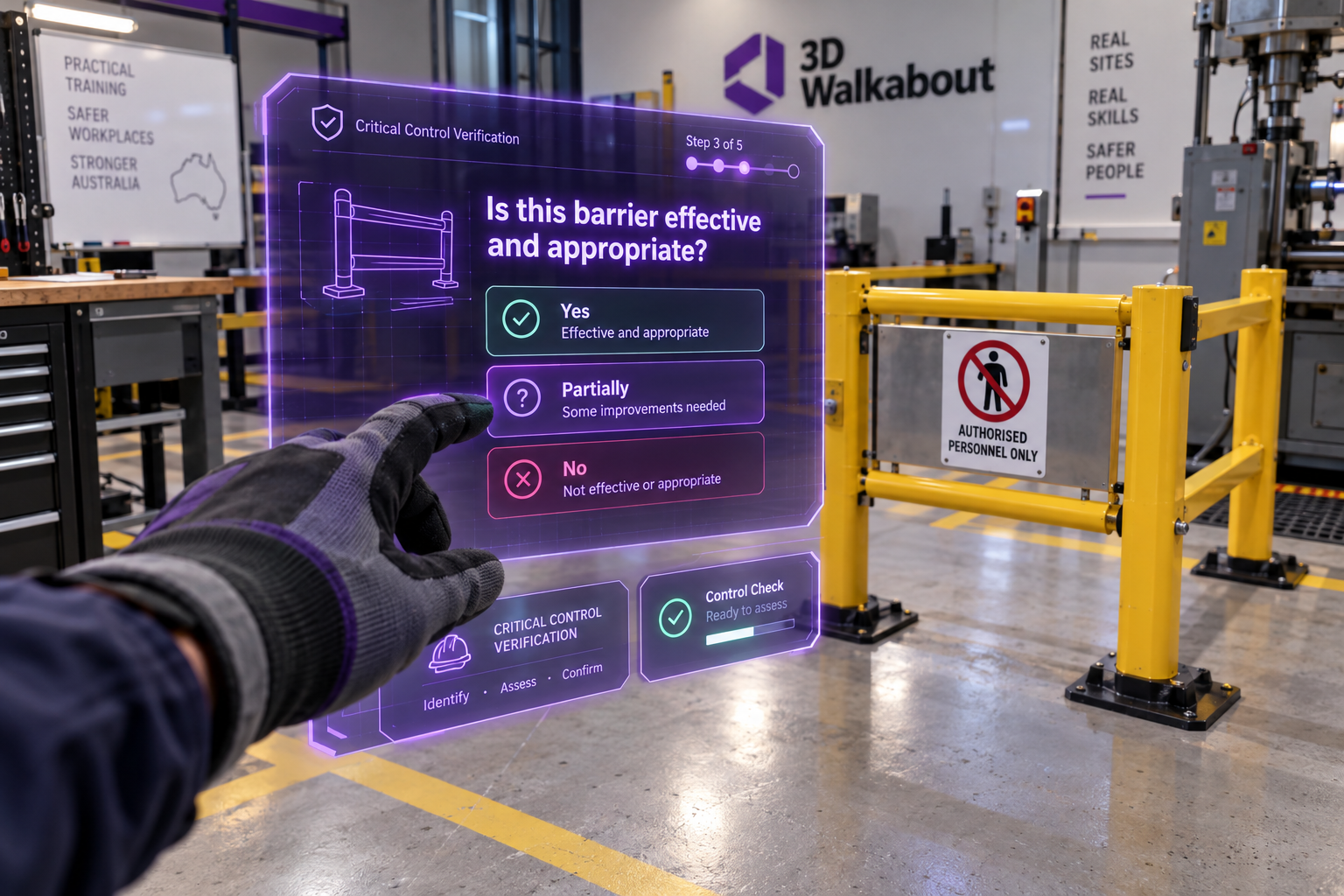
Critical Control Verification
The learner must inspect and confirm whether a barrier is present, effective and appropriate rather than relying on a prompt or assumption.

Plant and Pedestrian Interaction
Virtual vehicles or equipment can create line-of-fire and exclusion-zone decisions within a mapped room, without moving real machinery.

Working-at-Heights Preparation
Use physical training props and virtual surroundings to practise access, edge-protection, equipment and dropped-object decisions without placing the learner at height.

Emergency and Evacuation Decisions
Introduce alarms, smoke, blocked routes or changing conditions while the learner remains oriented to a real training area.
ASSESSMENT CAPABILITY
What Can Be Assessed?
Hazards identified or missed
Inspection path and areas overlooked
Critical controls selected and verified
Sequence of preparation actions
Responses when conditions change
Stop-work and escalation decisions
Time to recognise a developing event
Unsafe approach to virtual equipment or zones
Completion, retries and coaching requirements
WHY IT WORKS
The Value of Physical Context
Real Movement
Walking, turning, reaching and maintaining position can form part of the exercise without creating an entirely virtual room.
Real Props
A barrier, tool, training harness, control mock-up or workbench can provide tactile feedback while virtual content changes the scenario around it.
Visible Facilitator
An instructor can remain part of the physical session, intervene where required and support immediate debriefing.
Controlled Virtual Consequences
The scenario can demonstrate the result of a missed control without reproducing the injury, damage or operational event.

A Controlled Room Is Still a Workplace Risk
The application must account for the learner wearing a headset. Passthrough does not provide identical vision or depth perception to the naked eye. Boundaries, trip hazards, other people, props and movement need to be managed through a documented setup and facilitation process.
LEARNING MODES
Guided Practice, Assessment and Debrief
A module can begin with prompts and highlighted controls, then remove assistance for practice and assessment. Results should support a useful conversation rather than simply produce a score. The debrief can focus on what the learner noticed, why they chose an action and which critical control was misunderstood.
Guided Mode
Prompts and highlights on
Hazards are highlighted, critical controls are prompted and the learner is guided to each decision point. Used for initial familiarisation and low-confidence learners.
Practice Mode
Partial assistance
Prompts are removed. The learner must identify hazards and select controls independently. Errors are captured but do not end the scenario. Repeated practice until decisions improve.
Assessment Mode
No assistance
Full scenario with no hints, highlights or prompts. All decisions, timing, path and completion are recorded. Results feed the debrief conversation and coaching requirements.

Development Process
Define risk and decisions
Identify the risk, learner role and decisions to be practised.
Review controls and incidents
Review critical controls, procedures, incident themes and training requirements.
Inspect room and props
Inspect the proposed training room and any physical props.
Prototype hazard placement
Prototype hazard placement, movement and safety boundaries.
Develop scenario branches
Develop scenario branches, consequences, guidance and result capture.
Validate with safety teams
Validate with safety, operational and training representatives.
Pilot and document
Pilot with representative learners and document the deployment method.
Why Use Mixed Reality for Workplace Safety?
Frequently Asked Questions
How is mixed reality safety training different from VR?
Mixed reality keeps the real training space visible and adds virtual hazards and content. VR replaces the environment completely.
Can virtual plant move through the real room?
Yes, within a controlled mapped area. The movement and learner boundaries must be designed to avoid collisions with real walls, people and props.
Can real safety equipment be used?
Yes, where the equipment is safe to handle and its use improves learning. It should not create the actual hazardous condition.
Can the simulation assess critical controls?
Yes. Learners can be required to identify, select and verify controls before proceeding, based on the organisation’s approved framework.
Is passthrough safe around live hazards?
It should not be assumed safe. A controlled training area is generally more appropriate because headset vision and attention differ from normal work.
Can an instructor see what the learner sees?
The headset view can often be mirrored to a display or facilitator device, depending on the deployment setup and network.
Can it replace practical safety training?
It can support preparation, practice and assessment of decisions, but it does not automatically replace supervised physical skills or legally required competency assessment.