HOME
HOME 3D RENDERING
 3D SCANNING
 XR DEVELOPMENT
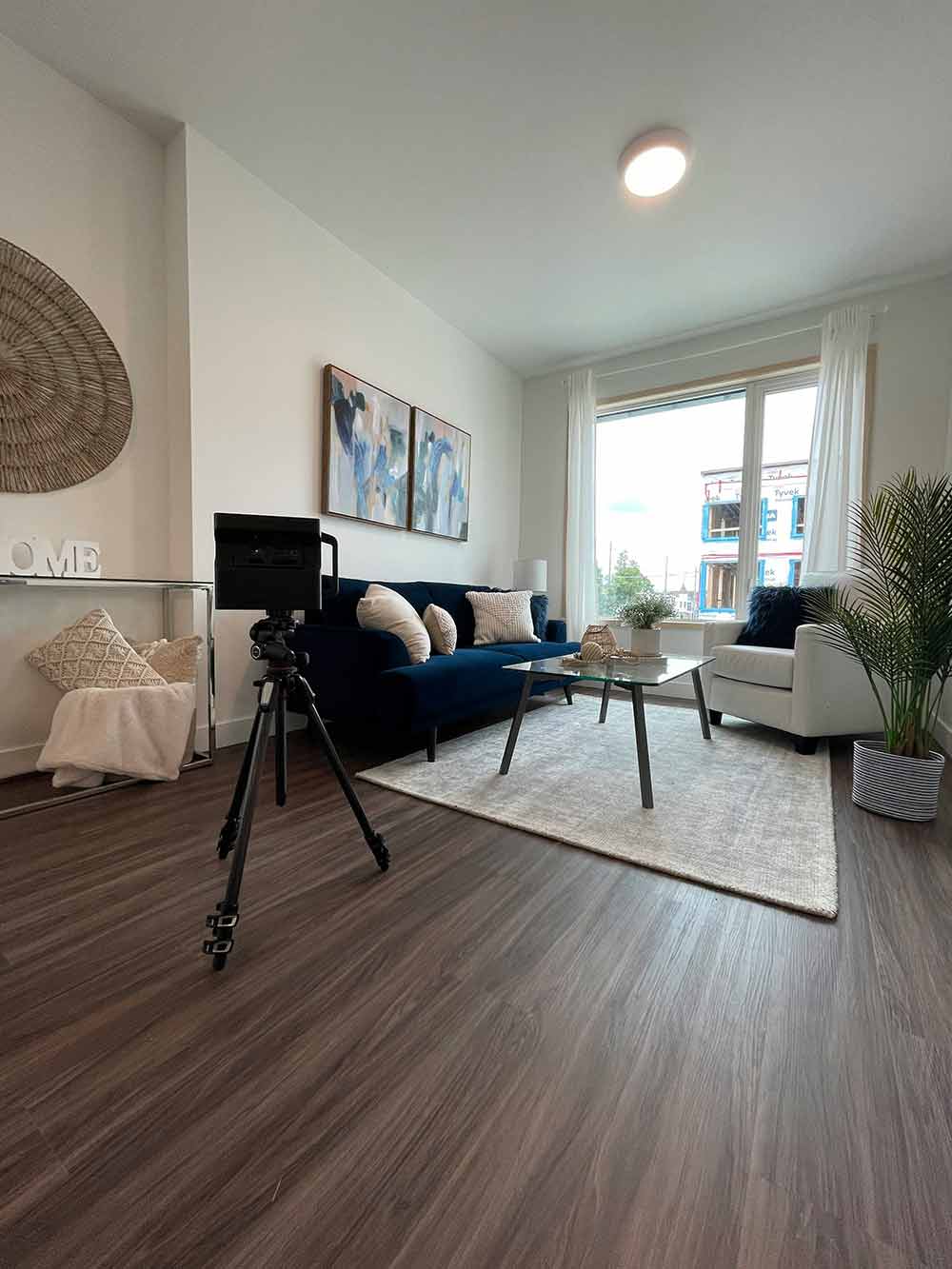
As the concept of virtual tours become more accepted among businesses, we’re likely to see more companies using them throughout 2024.
360 virtual tours provide two great benefits to businesses and prospective buyers. For businesses, virtual tours allow them to showcase their locations, highlighting every intricate detail, whilst immersing prospective clients with life-like imitations of locations.
For prospective clients, being able to experience an immersive and interactive tour of a property space, venue or work environment from the comfort of their own home or office offers a convenient and time-saving way to explore the premises.
This not only enhances the overall customer experience but also provides a comprehensive understanding of the space, aiding informed decision-making. As this trend continues to gain traction, businesses embracing virtual tours are likely to enjoy increased engagement, trust, and satisfaction from their clientele.
In this article, we’re going to look at seven of the best 360 virtual software platforms that suit a variety of needs.
Before we dive in, let’s first identify what virtual tour software is.
What is Virtual Tour Software?
Virtual tour software allows you to explore places in 360 degrees without being physically present.
It uses images taken from all angles, creating an immersive experience that feels like you’re really there. Whether checking out a house, museum, or city, the software lets you move around, zoom in, and examine details as if you’re on-site.
All virtual tour software will use a type of 360-degree camera to capture images from pretty much every angle to get a complete view of the area. These cameras can range from simple setups to more advanced devices designed for professional use. Some smartphones even have 360 built-in!
After capturing images with a 360-degree camera, virtual tour creators will use image-stitching software to produce a seamless panoramic view.
Whether you’re working on a sales property, a hotel or a restaurant, 360 tours are great for showcasing a variety of properties to give online visitors a sense of their environment.
In essence, virtual tour software allows people to virtually visit a location, making it easier to make decisions or explore without leaving your computer or phone.
The below virtual tour platforms have been selected based on their virtual tour quality, interface layouts, stand-out features and compatibility.
1. 3DVista Tour Standard
3DVista remains our top choice when it comes to the best 360 virtual tour tools.
With a tonne of unique features, such as their user-friendly 3D tour editor and live guided tours, 3DVista allows you to create custom tours swiftly and easily. You can also take complete control over camera angles, lighting, shadows, animations, textures and more to create truly unique and immersive experiences.
These tours can be included in any website too, so you won’t need to worry about any custom coding or import issues.
2. Lapentor
Yes, one of Lapentor’s biggest benefits is that it’s free.
However, additionally, Lapentor’s strengths lie in its easy-to-use interface and photo-editing software. Lapentor allows you to hide or remove flaws or unnecessary elements in your 360 images and tours. It’s also cloud-based so you can access it pretty much anywhere.
Whether you’re a photographer, editor or writer, Lapentor’s main quality lies in its accessibility and easy-to-use interface.
3. Marzipano
Marzipano is another free web-based virtual tour software (but requires Firefox or Chrome). It works by generating a virtual tour from a set of panoramas of any size.
Using the Marzipano Tool, you can quickly get started on processing your panoramas on your browser. Once processing is complete, you’ll be able to export your virtual tour application to Chrome or Firefox.
4. GoThru
GoThru’s tour creator helps you build a layer of information on top of your panoramic images. This allows you to point and click on a selected spot to uncover more information about that location. For example, if the tour focused on a museum, not only could you inspect each exhibition, but also the specifics of each piece of artwork or historical artefact.
GoThru, as well as being one of the most trusted 360 virtual tour tools, is recognised for its integration with Google Maps. Once approved by a GoThru Moderator, Gothru allows Google-trusted photographers to embed their 360-degree virtual tours directly into Google Maps.
This unique feature enhances the discoverability and accessibility of virtual tours, making them readily available to a broader audience.
5. RTV Fusion
RTV Fusion is one of the more feature-rich 360 tour platforms on the market. Fusion is their 5th release and their most powerful. They have a bunch of stunning virtual tour templates and layouts as well as a fully responsive HTML 5 virtual tour tech.
They also have a monthly newsletter to provide you with updates about their new features. In just a few clicks, RTV allows you to upload, connect, and publish your own fully 360 immersive experience.
6. Matterport
Matterport offers more of a specific 360 tour solution, in that it provides agents with schematic floor plans. The platform provides potential buyers with an incredibly accurate representation of floor plans, helping them make an informed decision when buying a property.
It also comes with a measurement mode to help measure pretty much anything in your space.
So, for estate agents, this could be room sizes, hallways, doorways, or anything else. Matterport saves agents a lot of time visiting properties and taking measurements and has become an essential tool for estate professionals seeking a comprehensive and efficient approach to property showcasing.
7. CloudPano
When it comes to live 360 video chat, CloudPano takes the top spot. At the click of a button, CloudPano allows you to jump into a 360-degree sales environment instantly.
Users don’t need to download an app to use CloudPano and it’s simple to set up. Plus, up to four people can join from any device and your tours made through it can be integrated with networks like Realtor and Zillow.
Although there is no free trial, CloudPano is certainly worth the investment.
Conclusion
Choosing the right 360 virtual tour platform for you comes down to your unique needs and requirements. Professionals in the estate agency industry may find platforms like Matterport incredibly useful, whereas CloudPano is better suited for those looking for the best live video chat tours.
Regardless of whether you’re in property, hospitality or something else, 360 virtual tour software platforms offer the most immersive depiction of your offering.
Hopefully our list above will help you make the right decision for your business!
Summary: What 360 virtual tour platform is ideal for your business?
Explore top 360 virtual tour platforms, including 3DVista, Lapentor, and Marzipano, for immersive business presentations and experiences.
Benefit from easy-to-use interfaces, live guided tours, and unique features, enhancing control over custom tours and visuals.
Discover free options like Lapentor and cloud-based solutions such as GoThru, ensuring accessibility and flawless panoramic image processing.
Matterport stands out for estate professionals, providing schematic floor plans and precise measurements for informed property decision-making.
CloudPano excels in live 360 video chat, offering instant access to immersive sales environments without requiring app downloads.
FAQs
What is an as-built survey and how does 3D laser scanning help?
An as-built survey documents the exact dimensions and layout of an existing building or structure. Using 3D laser scanning, millions of measurement points are captured to create an accurate digital representation of the space. This data can then be used to produce BIM models, CAD drawings, floor plans and point cloud datasets, helping architects and engineers design renovations or new works with confidence.
What is the difference between LiDAR scanning and photogrammetry?
LiDAR scanning uses laser sensors to measure distances and capture millions of highly accurate spatial points, creating a precise 3D point cloud of a building or environment. Photogrammetry uses overlapping photographs to reconstruct 3D models, which can be useful for visualisation but is generally less accurate for measurement. For architectural surveys, construction planning and Scan-to-BIM projects, LiDAR scanning is typically preferred because it delivers higher accuracy and more reliable spatial data.
How much does a 3D laser scanning project cost?
The cost of a 3D scanning project depends on several factors including site size, building complexity, deliverables required and the type of scanner used. Smaller projects may be completed for a few thousand dollars, while larger commercial or infrastructure projects require more extensive capture and modelling work. A tailored quote is typically provided after reviewing the project scope.
Can 3D scanning be used for renovations and refurbishment projects?
Yes. Laser scanning is widely used to create accurate existing-conditions documentation before renovation or refurbishment work begins. By capturing the building geometry in detail, designers and contractors can reduce measurement errors, improve coordination and avoid costly rework during construction.
Do you provide 3D laser scanning services across Australia?
Yes. 3D Walkabout operates scanning teams across major Australian cities including Sydney, Melbourne, Brisbane, Perth and Adelaide, and can deploy to regional and remote locations nationwide. Our team regularly works on projects ranging from single buildings to large industrial and infrastructure sites.
What is Scan-to-BIM modelling?
Scan-to-BIM is the process of converting laser scanning data into a Building Information Model (BIM). Using the captured point cloud, specialists create detailed digital models of the building in software such as Autodesk Revit. These models can include architectural, structural and MEP elements depending on the required Level of Development (LOD).
What is a point cloud and how is it used?
A point cloud is a digital dataset made up of millions of measured points that represent the exact geometry of a building or environment. These datasets allow architects, engineers and contractors to analyse existing conditions and create accurate models. Point clouds are commonly used as the foundation for Scan-to-BIM and as-built documentation.
What deliverables do you receive after a 3D scanning project?
Typical deliverables include registered 3D point cloud datasets, BIM models, CAD drawings, panoramic imagery and digital walkthroughs. Files can be provided in formats such as RCS/RCP, E57, Revit models and DWG drawings so they integrate easily into common design and construction software.
How long does a 3D laser scanning project take?
The time required depends on the size and complexity of the site. Smaller buildings can often be captured in a few hours, while larger commercial or industrial sites may take one or more days of scanning. Once the data is captured, processing and deliverables such as point clouds or BIM models are typically delivered within several business days.
What types of buildings and spaces can be scanned?
3D laser scanning can be used on almost any built environment including residential buildings, commercial offices, retail centres, industrial warehouses, hospitals, schools, infrastructure sites and heritage buildings. Large facilities such as campuses, factories and shopping centres can also be scanned using mobile LiDAR technology.
How accurate is LiDAR scanning for construction projects?
Modern terrestrial laser scanners can capture measurements with millimetre-level accuracy, depending on the equipment used. Survey-grade scanners such as the Leica RTC360 can achieve accuracy of around ±1.9 mm at 10 metres. This level of precision makes laser scanning suitable for architectural surveys, construction verification, and detailed BIM modelling.
What is 3D laser scanning for buildings?
3D laser scanning is a reality capture technology that uses LiDAR sensors to measure buildings and environments with millions of precise data points. The result is a highly detailed 3D point cloud that represents the exact geometry of the space. This data can then be used for Scan-to-BIM modelling, CAD drawings, digital twins, and building documentation.